4.3. Automating Reporting
In most teams, reporting means chasing people for updates: ‘Is this done yet?’
Plansom removes that step. As the outcomes for goals and tasks are updated, the platform updates you through its dashboards and threads. Everyone sees the latest status in context, including blockers or delays, so nothing stays hidden.
How It Works
- Team members update their tasks or outcomes
- Plansom captures the change instantly
- Updates appear in the goal thread and dashboard
- Everyone has the same live picture of progress without extra reporting work
Automated reporting means fewer interruptions, no missed updates and a steady flow of clarity for the whole team.
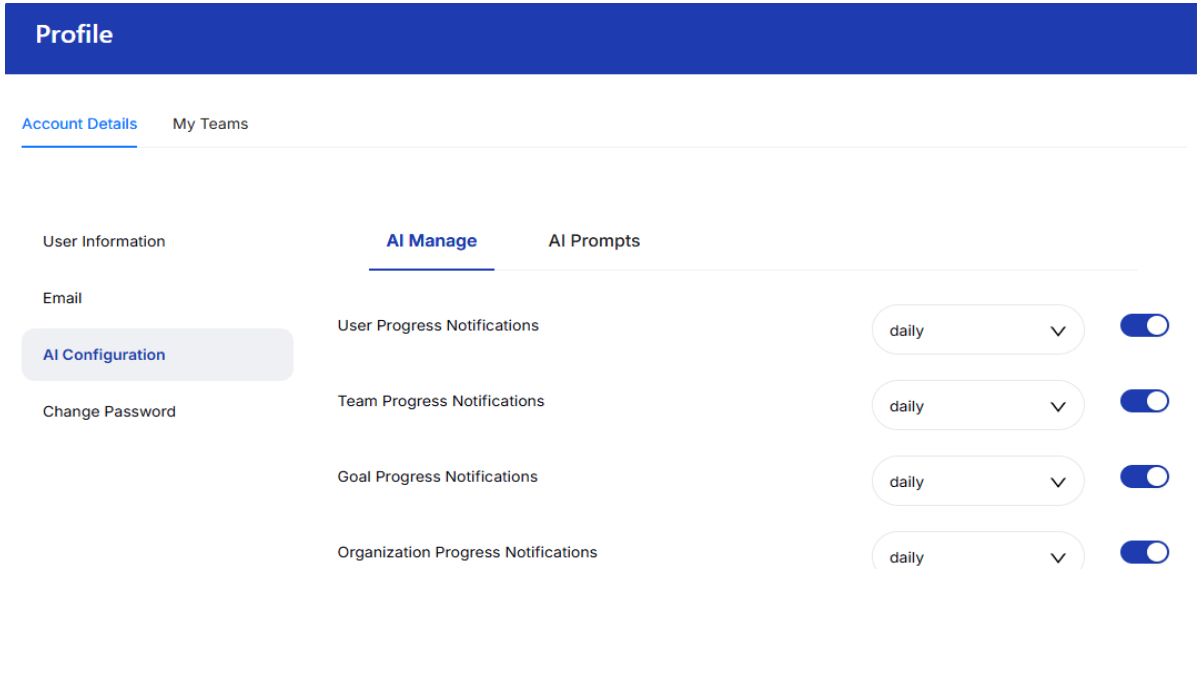
Setting Which Updates You Get
- Click your profile name in the top-right
- Choose Profile from the dropdown and select Account details
- Open the AI Configuration tab and click on AI Manage
- Select which type of progress notification you want, along with the frequency